
In the first three parts of this PTO optimization journey, I dwell on the mathematics of some optimization problem that would tell us which trips to take and when. The burden of this approach is data. Not only do we need data regarding our pool of trips, we need data on how we would assign value to these trips. Determining value isn’t trivial. To assign value to a trip, we need to capture our subjective preferences which live in our brains.
For now though, what if we instead use our brains to do the decision making instead of our optimization problem. This saves us from having to pull out preference information! The trick now is to collect and aggregate our trip data into a useful format that our brain can easily digest.
Let me introduce the Calendar of Adventures. I made this tool to help me coordinate between 1) when I have days-off, 2) when trips are, and 3) when I already have a trip planned. In this article, I discuss this tool’s features, despite being a work in progress. I also share my experience creating it using ChatGPT. Spoiler alert: it was a pain.

The Calendar Layout
When you open the calendar, you see the standard calendar layout. The intention is to have a calendar view of when certain trips are in comparison to your days off, to dates where you already have a commitment. We can get a wholistic view of the whole year to help us make decisions.
At the top of the page are two buttons: one to mark free days and one to mark locked days. I consider free days to be dates where we wouldn’t have to use a PTO day. Think weekends and holidays. When I enable the freeday selection button, I can click on dates to mark them as free. They will change color. Also, I can click on the day headers to mark all occurrences of that day as free. For example, if I click “Sat” at the top of one of the months, all Saturdays are marked as free.
Locked days are dates where we already have a commitment, and thus we shouldn’t consider any trips that overlap with a locked day. We mark a date as locked just as we did with free days but now by enabling the locked selection button. A date can be both a free day and a locked day.
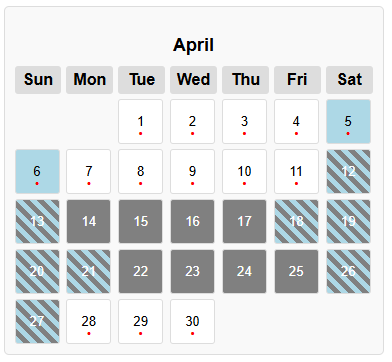
An example of dates marked as free (blue), dates marked as locked (gray), and dates marked as both (hatched)
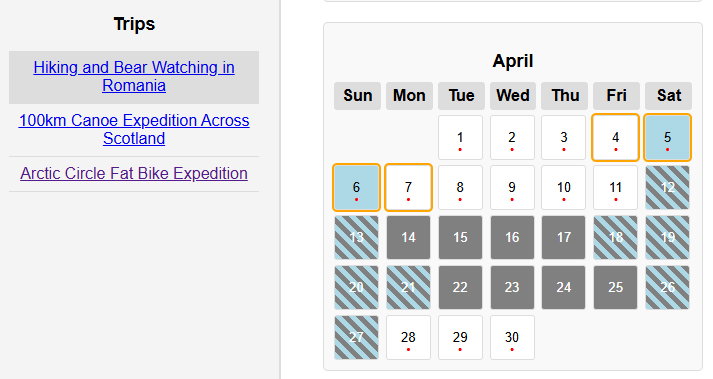
You see a red dot on certain dates. This indicates that there is a trip that occurs on that date. If you click on a date with a dot, a list of trips will appear in a sidebar. These are the trips that occur over that date. Then when you hover over one of the trips in this sidebar, the dates of that trip are highlighted in the calendar. Any trip that overlaps with a locked date is automatically filtered out.
Hovering over a trip to highlight the dates that trip occurs
State of the Calendar
The calendar is by no means a finished product. It is everchanging. The trips included in the calendar will continue to grow as I hunt down new opportunities. Currently, the trips included are heavily skewed towards outdoors adventure style trips, but I hope to add more variety. Of particular interest to me are music festivals, wellness retreats, and athletic events.
There is much more functionality I’d like to add as well. Implementing filters on trips, like filtering for trip length or type, are at the top of the list. Additionally, I need to explicitly add a PTO usage counter so we can easily see how many PTO days we have planned.
Coding with ChatGPT
The Calendar of Adventures is a React app. I’ve never used the React framework before so turned to the free version of ChatGPT to lay a foundation. The experience left much to be desired. My first task for ChatGPT was to create a calendar layout on a website with selectable days. It generated the code for this and it worked just fine. When I started asking ChatGPT to add additional features, the frustration started.
As I ask ChatGPT to add features, it would routinely erase code for features that were already included. To try to stop this, I would ask ChatGPT to repeat what all the features I asked for were, and I explicitly included in the prompt to not erase any existing features. I recognize that the free version of ChatGPT is not necessarily fine-tuned to coding so shouldn’t have put too much expectation on it to generate an entire app written in efficient code.
I have, however, used an LLM fine-tuned for coding for other tasks. When asked to do a lot, it generates very bloated code. It tends to provide the best value when asked to generate small snippets of code. Something that a typical developer might to go Stack Overflow for. This reminds me of a post I read on LinkedIn where the poster suggests the future role of developers will be to correct AI-generated code.